Wednesday, 26 July 2023

Monday, 22 November 2021
Student Hardware Reviews: Aufero Laser 1 Engraving Machine
After our very positive experience with the X,Y Plotter that Uunatek sent us, they kindly shipped us another product for review. This time, it was the Aufero Laser 1 Engraving Machine. Below is the review written by Alisa, a grade 6 student, who took on the responsibility of putting it together:
Assembly
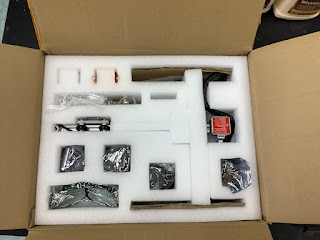
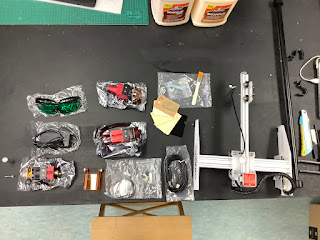
When we received the robot, it was carefully packaged with layers of foam on the inside. This is what you will find after opening the box. It also included a paper with links. One of them shows you how to assemble the robot, the other is a software guide.

Wednesday, 6 October 2021
Student Hardware Reviews: iDraw XY Plotter

Recently, a company called UUNATEK reached out to me to ask for a review of their iDraw Pen Plotter. This happens from time to time and I am always excited when I can give students an opportunity to beta test or review a product and see that their opinions matter and can hold sway in the "real world". These sorts of partnerships can also make a big difference for schools running STEAM on a limited budget and you may be surprised how much free stuff you can get for your classroom just by sending an email and asking.
The iDraw is not the first plotter that I have had here in the STEAMlab. I bought a Makeblock XY Plotter years ago to do some laser engraving and while that one doesn't get a lot of use, this one got my students really excited. Over the course of a few recesses and lunches, three grade six volunteers put it together and ran it through its paces. With practically no help from me, they managed to get it up and running and did some pretty cool stuff with it.
Once I've had some time with it myself, I will post my own thoughts on the iDraw. For now, I want to share the thoughts of the three grade six girls who have been giving up their time to come in to the lab and build this robot for me.
Reviewing the iDraw Pen Plotter
by Stella, Yu-Hsuan and Alisa
Assembly
 |
| When we received iDraw, it was carefully wrapped in plastic, and it was easy to open. |
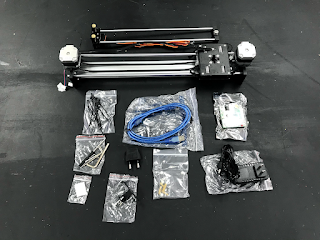 |
| This is what we got when we finished unwrapping it. |
 |
| We connected the two parts for the X and Y axis. |
 |
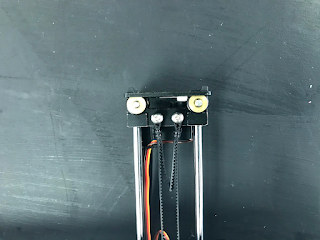
| After that, we had to screw in two tiny black screws. It was a little bit challenging, since the two poles kept moving and were somewhat oily. |
 |
| Next, we attached two belts on the y-axis. This part was very difficult for us. The belts are very tight, which makes the screws hard to screw in, so you might need the help from another person. |
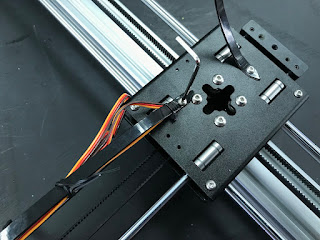 |
| Then we screwed in the screws connected to the wires. |
 |
| We connected the transparent plate to the plotter using plastic screws and golden connectors. |
 |
| Then we added the microchip on top of the transparent plate, this time using metal screws connected to the plastic ones. |
 |
| We plugged in the cables in the appropriate slots. We plugged the bottom left plug incorrectly, and that resulted in the plotter not being able to go up and down while drawing, but once we realized, we fixed it quickly by turning the plug around, and the plotter worked perfectly after that. |
 |
| We then paste the four transparent protection stickers on the four corners below the plotter. Then we were done! |
Our Opinion
Wednesday, 29 September 2021
A dad's return to D&D and the best resources I found along the way

As it has for so many others it seems, the last couple of years have created the perfect storm to get back into Dungeons & Dragons after so many years. Stuck at home, trying to find ways to keep the family entertained without constantly staring at screens, we found ourselves playing a ton of board games and one thing led to another...
The kids started asking about it when we watched the first episode of Stranger Things together and I was able to regale them with tales of AD&D Adventure from when I was young. We discovered Critical Role (a group of voice actors who started sharing their games on YouTube in 2012 and have now become an institution with half a million viewers each week and their own books) and so many others sharing their gameplay online and it didn't take much coaxing after that to get them to give it a try.
We started with the D&D Essentials Kit and I'm glad we did. it included everything we needed to get started and instead of more traditional story modules that can take weeks or months to complete, this set is based around shorter one-shot adventures. This worked well for us for a couple of reasons. For the Dungeon Master, preparation was a lot simpler. Each session would only take an hour or two and I didn't need hours and hours to get everything ready. Also, our kids' friends have busy lives. D&D would have to compete with one kid's soccer, another kid's swimming lessons and so on. By playing a series of shorter adventures, it was a lot easier to play with a different group of kids each time. If someone missed a session, it was no big deal. The other option would have been the D&D Starter Set which includes as more traditional module that by all accounts would take about five 3-4 hour sessions to complete. In fact, now that we have established a core group of kids that show up pretty consistently, we will likely switch to longer-form adventures but it would have been tricky if we had started with that.
The best resource that I found to get things going was a YouTube channel called Bob World Builder. He is a supremely like-able character who offers helpful advice for setting up and running your games with the emphasis on making sure that the players have a good time. He created a series of videos specifically for the D&D Essentials Kit. For each adventure in the kit, there is one DM Guide to help a Dungeon Master prepare, then a second play-through video so you can get a sense of how it might go. These videos were invaluable not only to help me relearn how to run a game but they also made me feel like I could do it. Even as a person who grew up on D&D, getting started felt overwhelming before I discovered Bob.
The folks at Critical Role created a series of cute video shorts called Handbooker Helper to get people up and running. They were definitely useful and I come back to some of them from time to time if I need a quick refresher on something. But for something more comprehensive, I really got a lot out of a series called How to Play Dungeons and Dragons 5e on a channel called "Don't Stop Thinking". These animated videos take their time and show you exactly how to do all of the things you need to do (i.e. how to roll for initiative to determine turn order during combat or how to do saving throws to determine if a player or creature will succumb to a magic spell.) He gives detailed examples so you can walk away from the video quite confident that you will know what to do during your game.
Since we already had the set, we encouraged my son's friends to download the rules. Wizards of the Coast have made the basic rule book available as a free download. For most people, this is all you will need. There are more advanced rule sets available in the form of the Player's Handbook, Dungeon Master's Guide, Monster Manual and more but after a few months of playing with our current group of kids we have not seen a need to go beyond the basic rules. We did get a set of dice as a welcome gift for each of the kids that has joined us but everything else has been on the cheap and we have done just fine.
As far as story modules go, we have mostly stuck with one-shot adventures. We jumped out of the Essentials Kit for a while and played through a series that we downloaded for free called Defiance in Phlan. This includes five short adventures that were designed to introduce new players to the game and were intended to be run in an hour or less at shops that sell other D&D resources. Each of these seems to have just the right balance of mystery, role-play, combat and the group really enjoyed playing them. Since each one was a stand-alone adventure, after running the first 3 sessions, I was able to pass on Dungeon Master duties to the kids. The stories were short enough and simple enough that these 11 year old kids were able to run them with minimal support from me.
One other resource that I want to shout out is actually another role-playing game called Hero Kids. This was not my first attempt to get my kids into RPG's. Our first try was with this game. For the most part, it is a very simplified version of D&D that is aimed at younger players. The players take on the role of child adventurers and the violent aspects of the game are de-emphasized. Most monsters will be defeated and run away rather than die slowly in a pool of their own blood... The stories are very well written and give lots of great detail. The game mechanics are simplified enough to make it easy for anyone to get their head around them and they don't require any special equipment to play. You just need to print out a few pages and have some 6-sided dice.
Recently, we have adapted some of these adventures for D&D and they have been a ton of fun to play.
The final resource that I want to talk about it Roll20. In case you are not run a group game in person, Roll20 offers a whole toolbox to make it easy to run games online and play remotely. These sorts of games do require a bit more preparation, but the few sessions that we tried online went well. It has build in audio and video communication and a digital whiteboard for sharing maps and moving tokens around to represent players' movements. You can create characters right there and upload any content you like. there is a ton of premium content on there as well that is available for purchase but even a free account is plenty for those who are just getting started.
I hope that people find some of this helpful. Even as someone who grew up on D&D, getting back into it seemed a bit intimidating at the start. I'm grateful for these content creators who made it a lot easier. It has been a great experience for us and our games have been a weekly highlight for all of us.
Friday, 9 March 2018
I Learned it all on YouTube Part 2
Anybody with an interest in woodworking probably already subscribes to Izzy Swan's YouTube channel Some of the most interesting and innovative projects I've every seen are on his channel and there are videos on there that I have watched a dozen times. He can be unconventional, but I have also learned a lot of traditional techniques from watching him. And he's very entertaining.
He has built everything from a drill-powered T-Rex sculpture and a foot-powered lathe. This video of him making a wooden brace drill is the first of his that I saw. When I came across it today, I thought I would post. He hasn't put anything new up for a few months, but there is enough on his channel already to keep you going for a long time.
Thursday, 19 October 2017
How to make a non-responsive yo-yo responsive
The yo-yo would sleep... and sleep... and sleep. I opened it up and discovered they all had bearings in them. I scanned through a dozen or so YouTube videos for advice on how to make them more responsive. Some people suggested jamming the string in between the bearing and one of the faces of the yo-yo. That way, it won't sleep at all. Another suggested looping the string multiple times over the bearing. That should make it a bit more responsive. It didn't work well for ours.
I just wanted a traditional yo-yo, but I didn't want to use any adhesives, in case I want to try my hand at using it as a non-responsive yo-yo later on. The simplest solution?
Plumber's tape, also known as thread seal tape It works great. Everyone probably has some at home. It isn't sticky. And it only took a couple of seconds.

Here's my new yo-yo.

Unscrew the sides.

Grab a length of tape.

Wrap it around the bolt hole on the face of the yo-yo.

Tuck it in nicely so it won't get in the way of the string (I used a pair of tweezers).

Screw it back together. Done!
The tape is so fine that it is easily tucked out of the way and won't increase the size of the gap when you screw the sides back together.
Iconic Design: Bic Pen
I bet we all have one or two of these. Learn the story of this perfectly designed product. (I question his argument that the pen caused an...

-
Two companies make the technology that makes all the fastest microchips possible:
-
Since I started along this road as a tech teacher, I have always had this awkward feeling as though I were some sort of impostor. There are ...
-
This year, my students and I have been learning the basics of programming using a programming language called Processing ( see previous ent...

